

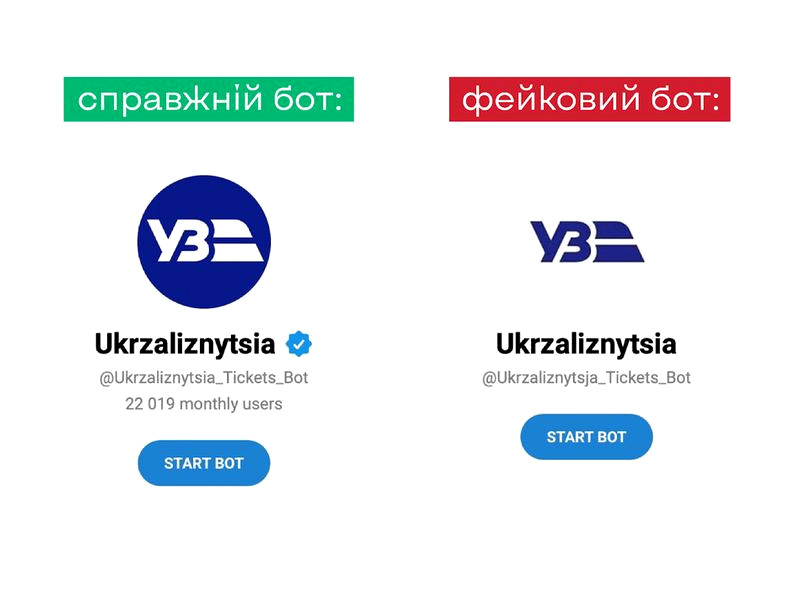
In Ukraine, the number of fraudulent chatbots imitating governmental and volunteer services is on the rise. Their aim may be to steal personal information or finances.
Identifying and blocking these fake resources is not an easy task. Cyber police are working on the issue, but new fraudulent pages keep appearing.
For instance, the "Enemy" chatbot has multiple clones, hindering users from reporting the movement of enemy forces. Additionally, the ticket purchasing chatbot, "Ukrainian Railways," has numerous counterfeits that may not function when needed. This can lead to financial losses due to unscrupulous developers.
How to identify a fake bot?
Here are some signs:
● Fake bots look similar to the real ones but have one extra letter in the name or URL.
● They lack a blue verification badge or have a counterfeit version.
● They respond in Russian or have a menu in that language.
● They may not work, creating the impression that government services are ineffective.
To check a bot, use the "Bot Checker" tool on Dovidka.info.
What is Bot Checker?
It is a database of verified Ukrainian chatbots, developed by the Center for Strategic Communications in collaboration with the cyber police.
"Over the past three years, Bot Checker has been used by more than 100,000 people. We developed this tool when fraudulent chatbots started appearing in 2022 to help citizens identify fakes," says Mykola Balaban.
How to use Bot Checker?
- Enter the name or URL of the chatbot in the search field.
- Get information about its authenticity and developer.
- If the bot seems suspicious, report it to the cyber police via the chatbot @stopdrugsbot (BRAMA on Telegram).
Be cautious! Don't let the enemy gain access to your data!